Image Converter Online
Convert JPG, PNG, WEBP & More Image Formats Free





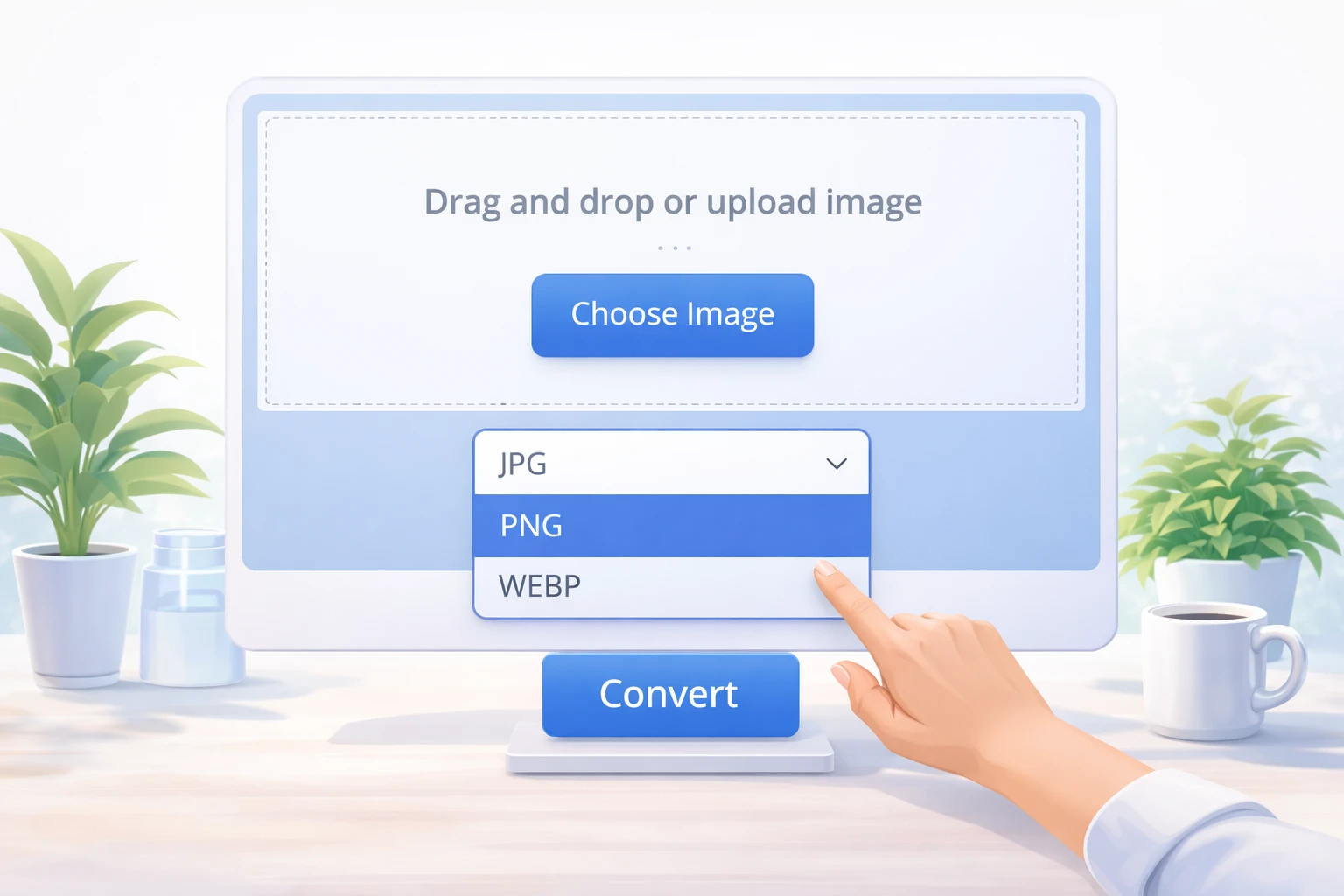
Image Converter Online – Free Photo Format Converter
By Chandu | Updated on January 2026 | Free Image Tool
image converter online is the easiest way to change one image format into another when a website, app, or software refuses to accept your current file type. A free online image converter helps when you have a WebP image that will not upload, a HEIC photo from iPhone that a government portal cannot read, or a PNG logo that needs to be in JPG for a document.
Many users see errors like “unsupported format”, “file type not allowed”, or face email size limits because their images are too heavy or in the wrong format. A blogger may need to convert PNG to JPG to reduce size, a designer may convert SVG to PNG for previews, a student might need JPG instead of PDF, and a developer may prepare site images from WebP to JPG for older browsers. ChanduSEOTool’s Image Converter Online is browser based, needs no signup, and gives instant results. You simply upload, choose the target format such as JPG, PNG, WebP, or PDF, and download your converted file in seconds.
Key Benefits of Image Converter Online
- 100% free: Use the image converter online as many times as you want without paying for subscriptions or licenses.
- No signup: Start converting images instantly without creating an account, entering email, or sharing personal details.
- Fast conversion: Converts images within seconds, even when handling large photos or multiple files one by one.
- Works on mobile: Open the free online image converter on your phone browser and convert photos directly from your gallery.
- No quality loss: For most common conversions like JPG to PNG or WebP to JPG, the tool keeps visible quality almost identical to the original.
- Secure & private: Files are processed online without long-term storage; always use trusted devices and connections for sensitive images.
- Multiple format support: Convert between JPG, PNG, WebP, HEIC, GIF, PDF images, and other popular formats used on websites and apps.
- No watermark: Download clean converted images without logos or text added on top.
- Beginner friendly: Simple drag-and-drop interface with clear buttons, suitable for students and non-technical users.
Why Choose Our Image Converter?
| Feature | Our Tool | Offline Software | Other Online Tools |
|---|---|---|---|
| Free to use | ✔ | ❌ (often paid) | ❌ (limits / paywalls) |
| No signup | ✔ | ✔ / ❌ | ❌ (account needed) |
| Conversion speed | ✔ Fast | ✔ Fast | ❌ Depends on server |
| Quality retention | ✔ High | ✔ High | ❌ Sometimes low |
| Mobile support | ✔ | ❌ (PC only) | ✔ / ❌ |
| Privacy | ✔ No long-term storage | ✔ Local files | ❌ May store uploads |
| Watermark | ✔ No watermark | ✔ Usually clean | ❌ Often adds logo |
| Ease of use | ✔ Very simple | ❌ Complex menus | ✔ / ❌ Varies |
Table of Contents
What is Image Converter Online?
image converter online is a simple web tool that changes your image from one format to another without installing software. For example, it can convert JPG to PNG, PNG to JPG, WebP to JPG, HEIC to JPG, or images to PDF pages.
Different sites and apps prefer different formats. Some accept only JPG for profile photos, some require PNG for transparent logos, and some online forms ask for images inside a PDF. An online image format converter solves these problems from your browser so you can upload the correct type wherever needed.
The same tool can also be used together with other conversions like image to PDF, picture to text (OCR), or photo to high resolution using separate dedicated tools on your site. This keeps your full workflow online: convert format, then resize, compress, or crop as required by the target platform.
Why Use Image Converter?
For Website Owners
Website owners often need consistent formats to keep pages fast and clean. Converting big PNG screenshots into lighter JPG files helps reduce page weight and improve loading speed. When working with icons, converting PNG to ICO or PNG to WebP can improve performance and compatibility.
Many CMS platforms or page builders also support only certain file types for favicons, banners, or thumbnails. With an image converter online, a site owner can quickly prepare JPG, PNG, or WebP versions that match theme requirements without using heavy desktop software.
For Social Media Users
Social platforms like Instagram, Facebook, Twitter, and LinkedIn have their own rules for images. Sometimes they compress files heavily, sometimes they refuse rare formats like HEIC. Converting photos from HEIC to JPG or from WebP to PNG helps ensure your images are accepted and displayed correctly.
Users may also want to create GIFs or convert video frames to images using separate tools, then adjust formats for profile pictures, cover images, and story graphics. A consistent format makes it easier to reuse the same images across multiple platforms.
For Designers
Designers handle many formats: JPG for photos, PNG for transparent assets, SVG for vector icons, and WebP for optimized web images. Using a quick image converter online, they can export client previews in JPG, share transparent logos in PNG, or convert SVG to PNG for quick mockups.
Sometimes clients cannot open advanced formats like PSD or TIFF. In such cases, converting to commonly supported formats like JPG or PDF makes it easier to share designs for review and feedback without confusing the client.
For Students
Students regularly upload images to online exam forms, project portals, and college websites. Many portals only allow JPG photos or ask for images inside a single PDF. Using a free online image converter, a student can convert PNG or HEIC photos to JPG and then combine them into PDF using a separate tool on the same site.
This avoids last-minute stress when a form shows “wrong file type” just before the deadline. Converting files directly from a phone or shared computer keeps the process quick and easy.
How to Convert Images Online
Step 1: Open the Tool
Visit ChanduSEOTool and open the “Image Converter Online” tool. The interface runs in your browser, so you do not need to install any software on your device.
Step 2: Upload Your Image
Click the upload area or drag-and-drop your file. Most common formats are supported, including JPG, PNG, WebP, HEIC, GIF, and sometimes PDF images. The tool reads the file and shows its current format and basic details.
Step 3: Choose Output Format
Select the format you want to convert to, such as JPG, PNG, WebP, or PDF. You might choose JPG for universal compatibility, PNG for transparency, WebP for better compression, or PDF when the image needs to be part of a document workflow.
Step 4: Start Conversion
Click the convert button. The image converter online processes your file and prepares a new version in the selected format. This usually takes only a few seconds, depending on file size and internet speed.
Step 5: Download the Result
Once conversion finishes, a download button appears. Save the new file with a clear name, for example profile-photo.jpg or logo-transparent.png, so you can easily find it when uploading to websites, forms, or social media.
For important work, keep both original and converted versions. If you ever need a different combination (for example PNG to JPG instead of JPG to PNG), you can convert again from the original to reduce repeated quality loss.
Convert Without Losing Quality
Any time you change format, there is a chance of quality change. Some formats use compression (like JPG), while others are lossless (like PNG). The goal of a good image converter online is to preserve as much visible detail as possible while producing a file compatible with your target use.
When converting from PNG to JPG, the tool compresses the image but keeps color and sharpness good enough for normal viewing. For line art, text-heavy screenshots, or logos, PNG is often better because it keeps edges crisp without introducing blur. For photos, JPG and WebP provide a good balance of quality and file size.
To avoid noticeable quality loss:
- Convert directly from the best available original file instead of a previously compressed copy.
- Avoid converting back and forth (JPG → PNG → JPG) multiple times.
- Use PNG or PDF for images that include small text or detailed UI screens.
- For printing or high detail work, keep a high-resolution master file in a safe folder.
Supported Formats
The exact list may vary, but a typical image converter online supports the most commonly requested formats from real search demand like JPG, PNG, WebP, HEIC, GIF, and PDF-style image conversions. These cover almost all normal use cases for web, forms, email, and documents.
Examples of common workflows:
- Convert WebP to JPG for older browsers or offline apps.
- Convert HEIC to JPG when transferring photos from iPhone to Windows or government portals.
- Convert JPG to PNG for transparent overlays, icons, and UI assets.
- Convert images to PDF using specialized “image to PDF” tools on the same site for document submissions.
If you work with more advanced types like SVG, TIFF, or RAW, you can still use dedicated tools for those formats when needed, then use this converter to create lightweight sharing versions.
Common Issues & Fixes
Image not uploading
Check that the file is a real image and not a renamed document. Very large files or corrupted downloads may also fail to upload. Try refreshing the page or using a different browser if the problem continues.
Unsupported format
If the file uses a rare format, first export or save it from your original software as JPG or PNG, then use the image converter online for further conversions. Some advanced formats like PSD or RAW may not open directly in a simple web converter.
Converted file looks blurry
Blurriness often happens when converting a small image to a larger size or after multiple compressions. Go back to the original, keep similar dimensions, and convert only once. For screenshots or logos, prefer PNG to maintain sharp lines.
File size still too big
Some websites set both format and size limits. After converting, you may also need to compress or resize the image using separate tools like “Image Compressor” or “Resize Image” on ChanduSEOTool to meet a specific KB or pixel requirement.
Privacy concerns
For sensitive images like ID cards or official documents, always use trusted networks and devices. While the tool is designed to process images online without unnecessary storage, users should avoid uploading very confidential data to any web service unless required.
FAQs
1. What is an image converter online?
It is a web-based tool that changes your image from one format to another, such as JPG to PNG, PNG to JPG, WebP to JPG, or HEIC to JPG, without installing any software.
2. Is this image converter online free to use?
Yes, the tool is completely free to use. You can convert multiple images every day without paying or creating an account.
3. Which image formats are supported?
Most common formats like JPG, PNG, WebP, HEIC, and GIF are supported, along with basic PDF image handling using related tools on the site. This covers photos from mobiles, screenshots, and web images.
4. Will my image lose quality after conversion?
When converting between compressed formats like JPG, there can be minor quality changes. For normal online use, the difference is usually small. For logos or text, PNG often gives cleaner results.
5. Can I use the converter on mobile?
Yes, the image converter online works on most modern mobile browsers. You can upload from your camera roll, convert, and download directly back to your phone.
6. Do I need to install any software?
No installation is required. Everything runs inside your browser, making it easy to use even on shared or restricted computers.
7. Is my data safe and private?
The tool is designed for quick conversion, not long-term storage. For extra safety, use it on your own trusted devices, avoid public networks for sensitive files, and delete downloaded files from shared machines.
8. Can I convert images for government forms and job portals?
Yes, you can convert images into commonly accepted formats like JPG or PNG for government forms, exam portals, and job applications. If they also require a specific file size, use the dedicated resize or compressor tools after converting.
Related Image Tools
- JPG to PNG Converter
- PNG to JPG Converter
- Rotate Image Online
- resize image to 50kb
- Image Resizer
- Base64 Convert Image
Conclusion
ChanduSEOTool’s image converter online gives students, bloggers, designers, developers, and photographers a fast and simple way to fix “wrong format” errors without touching complex software. By converting images between formats like JPG, PNG, WebP, HEIC, and PDF directly in the browser, you save time, reduce upload issues, and keep your workflow smooth.

Popular Tools
Recent Posts


